Company:
WatchGuard Technologies
Year:
2025
Duration:
3 months
Overview
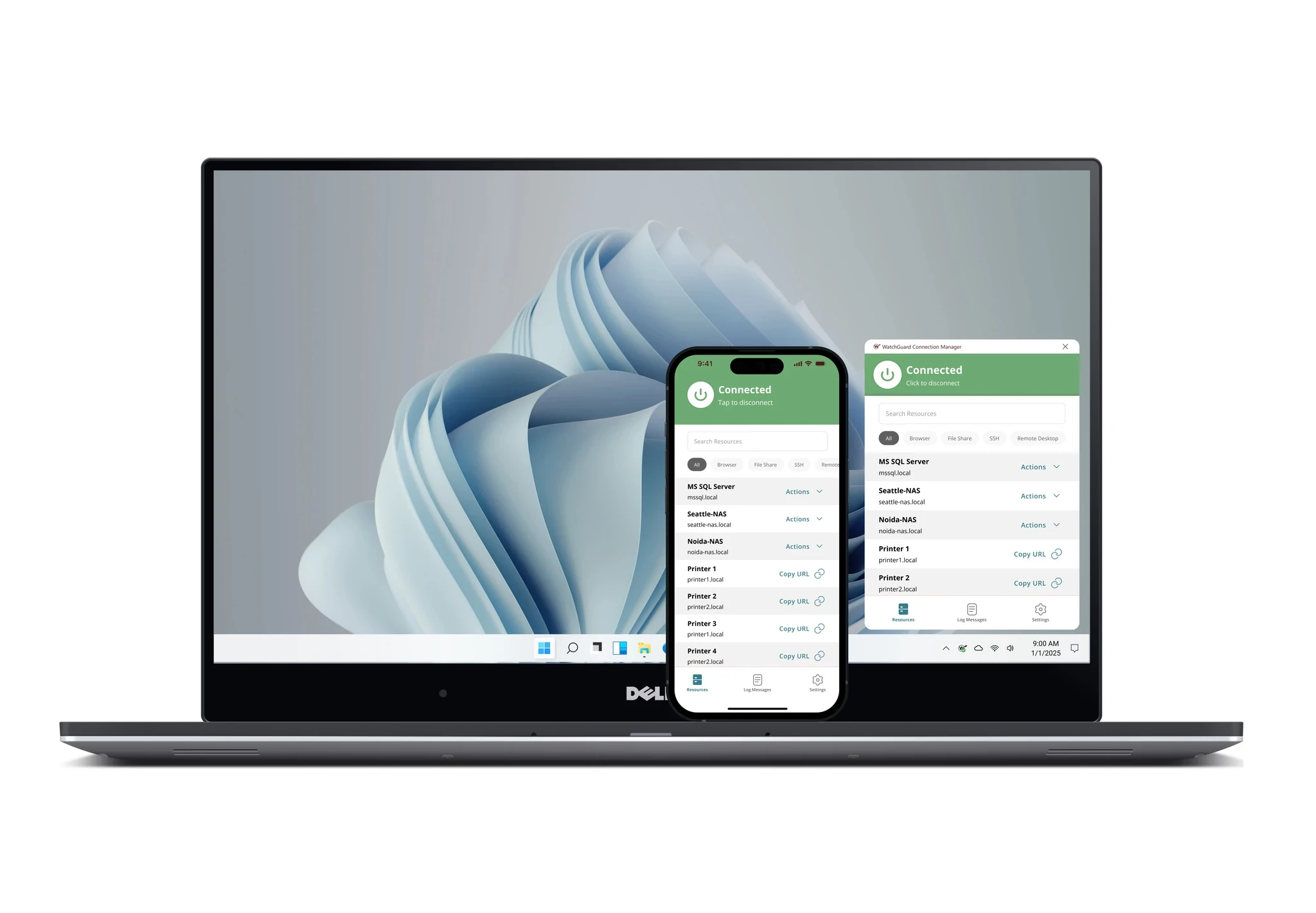
WatchGuard Connection Manager is a cross-platform application that connects users to FireCloud, WatchGuard’s cloud-managed secure access service. The experience supports iOS, iPadOS, Android, Windows, and macOS, giving users a consistent way to establish and manage their secure connection across devices.
I designed the mobile experience and redesigned the existing desktop application to create a unified product across all supported platforms. My work included interaction design, visual design, cross-platform pattern definition, prototyping, and close collaboration with product and engineering teams.

Problem
FireCloud users needed a simple application for connecting their devices to the service. The original MVP offered a minimal Windows and macOS system-tray application that primarily allowed users to connect, disconnect, and view basic log messages.
When the product expanded to iOS and Android, the existing desktop experience was no longer sufficient. Designing mobile applications independently would have created inconsistent interactions and visual patterns across platforms, while simply translating the desktop tray application to mobile would not have taken advantage of the additional functionality and interface space available.
The challenge was to create a cohesive experience that worked naturally across mobile and desktop operating systems, remained approachable for non-technical users, aligned with WatchGuard’s existing applications, and provided a scalable foundation for future capabilities.
Solution
I redesigned Connection Manager as a unified cross-platform product rather than treating the mobile and desktop applications as separate experiences. The design established shared navigation, status indicators, connection controls, terminology, and visual patterns so users could move between devices without having to relearn the product.
The primary connection experience was intentionally kept simple. Users could quickly understand whether they were protected, establish or end a connection, and access relevant status information without needing to understand the underlying networking technology.
At the same time, the interface was structured to accommodate additional functionality beyond the original connect-and-disconnect workflow. This created room for future connection details, troubleshooting information, settings, notifications, and other capabilities without requiring the application to be fundamentally redesigned.
The visual language was aligned with other WatchGuard applications, including AuthPoint and WatchGuard Endpoint Security, while being adapted to the interaction conventions of each operating system. Mobile and desktop versions shared the same core experience, but controls and layouts were adjusted where necessary so each application still felt appropriate for its platform.
The resulting design gave FireCloud users a consistent and approachable connection experience across iOS, iPadOS, Android, Windows, and macOS while providing the product team with a scalable foundation for future development.